Agentic AI that lives in VS Code.
EcodeX delivers fast responses, clean diffs, and one-click apply so you can ship without leaving your editor.
Live replies
See responses as they arrive, not after.
Diffs you can trust
Review changes quickly and apply with one click.
Durable chat history
Your chats stay saved on your machine.
Stay in flow.
Ask for a change, review the diff, apply it. All inside the sidebar.
Built for real sessions, not demos.
Fast iteration, clear edits, and minimal context switching.
How to Install ?
Set up EcodeX in your VS Code environment in just a few steps.
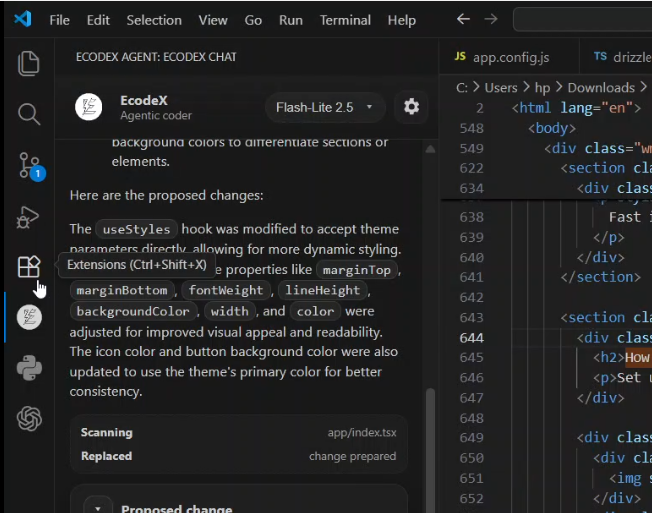
Step 1Go to extensions
Locate the Extensions icon on the left-side activity bar in VS Code or pressCtrl+Shift+X.
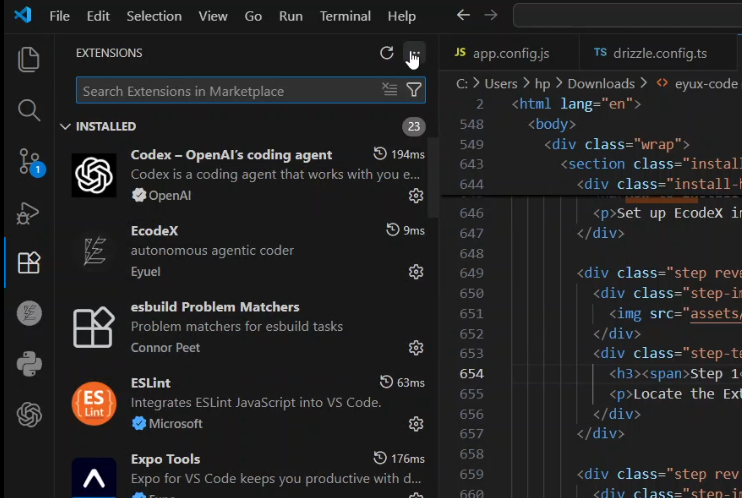
Step 2Click the three dots
In the top right corner of the Extensions panel, click the '...' (More Actions) menu button.
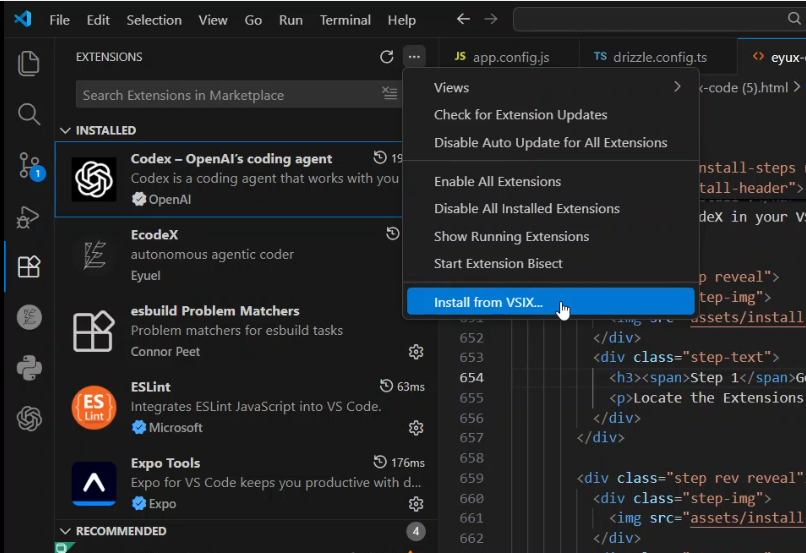
Step 3Install from VSIX
Choose the "Install from VSIX..." option from the dropdown list to open the file picker.
Step 4Select the file
Pick theEcodeX-0.0.1.vsixfile you downloaded from this site. The extension will install instantly.
Download the VSIX.
No sign-in. Install locally and start coding.